Grounded in your specs AI Test Case Generator Map the coverage, then write the cases you pick Ask, and check the answer Oracle AI Plain-English questions about your project, answered Compare Test Management Pricing Blog Docs Login Start free
Defect tracking

The bug tracker your test tool forgot. Native to your tests — no Jira required.

Most test tools stop at the test case and push bugs to Jira. Hawzu tracks defects natively — a drag-and-drop board with swimlanes and WIP limits, a full lifecycle linked to the failing step, and AI catching duplicates as you file. One system, not a bug tracker bolted on.

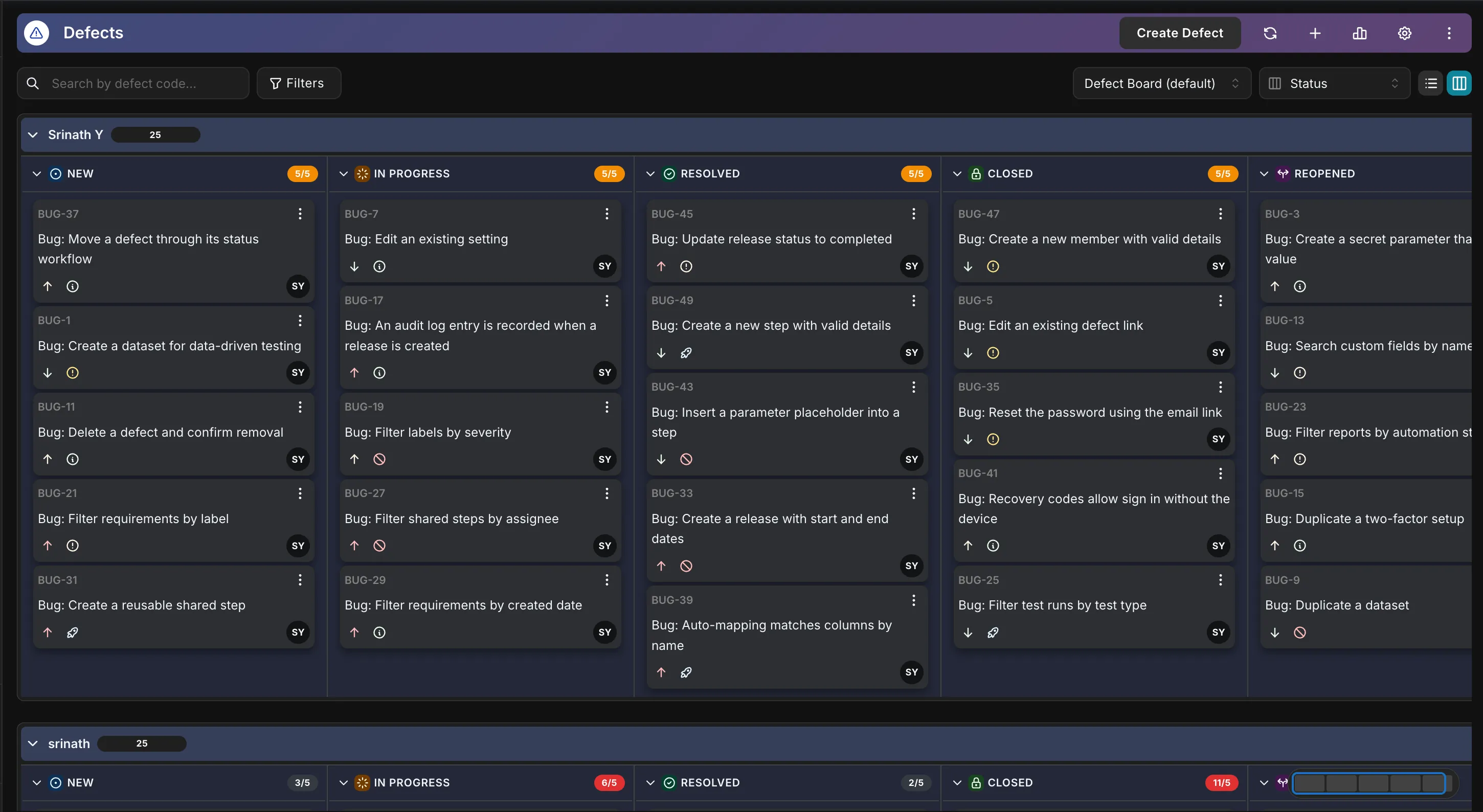
Hawzu's defect board — a Kanban board of defects grouped into columns, with swimlanes and WIP limits
Built in, not bolted on

Defects that live where the tests do

Everything a QA team needs to file, dedupe, trace, and sign off on defects — without leaving the tool your tests already run in.

A real defect tracker — native to your tests

Not an issues tab bolted on. A full lifecycle — New → In Progress → Resolved → Closed, and Reopened when it comes back — with severity, priority, resolution codes, assignees, labels, custom fields, rich descriptions, and a complete history and audit trail on every field.

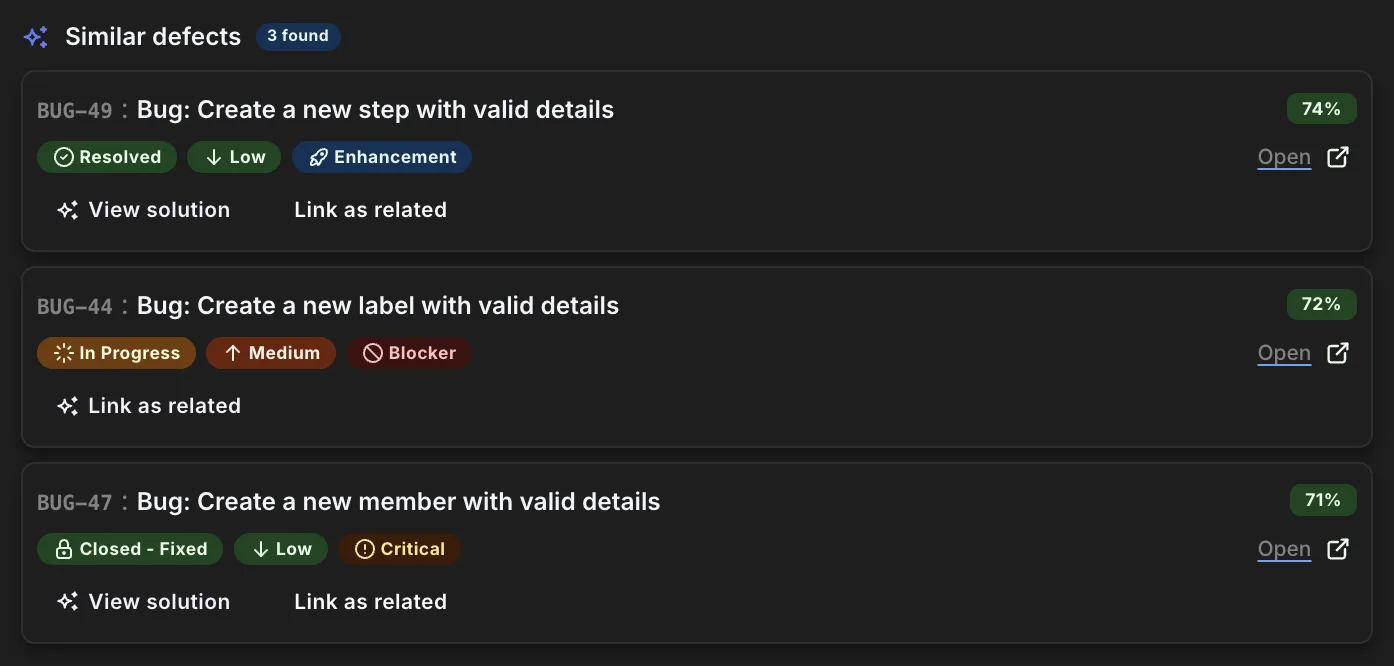
Catch the duplicate before you file it

As you type a new defect, Hawzu compares it against your project's existing defects and surfaces the closest matches with a match score — so you can close it as a duplicate, link it as related, or jump straight to the fix someone already shipped.

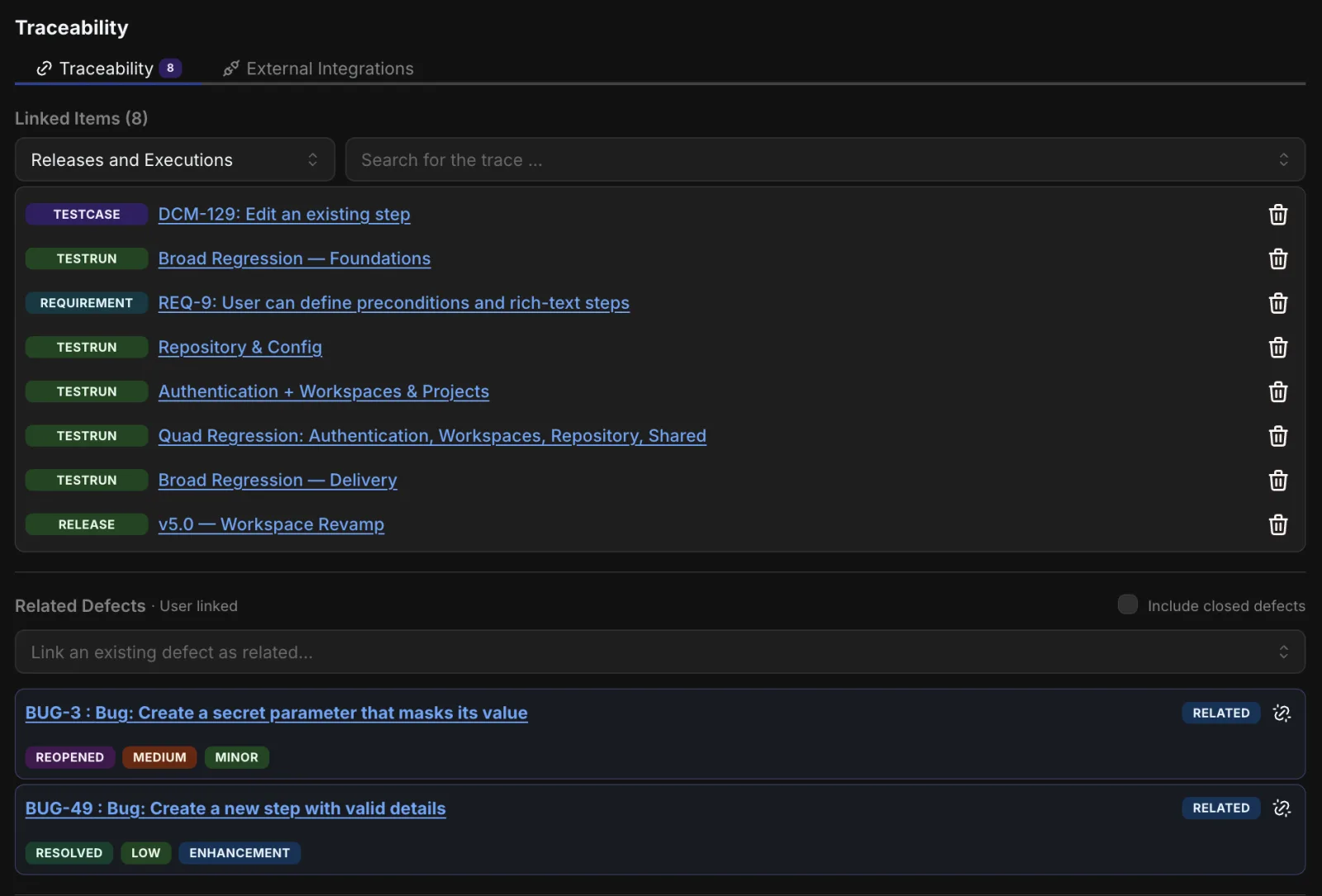
Every defect traces to the failing step

Link a defect to the exact test case — down to the step that failed — and to its execution, release, and requirement. See it from every side, and surface the failed tests that don't have a defect yet — or the defects that never got a regression test, with the missing case created and linked in one step.

Work the board, or work the list

A drag-and-drop Kanban board over your defects — group it by status, assignee, severity, priority, release, or your own dropdown field, split it into swimlanes, and cap a column with a WIP limit. Or stay in the table with fifteen quick filters and insight groups: stale, regression risk, release blockers, needs triage.

Defect-aware release sign-off

Release and execution Defect Insights map every defect to its executions and tests, summarize reopens, and roll up a Defect Health score. Complete or freeze a release and the defect picture is snapshotted — so your sign-off never drifts.

Native-first — connected when you want

Prefer the bug to live in Jira, GitHub, GitLab, Azure DevOps, or Linear? File it there as you raise the defect — or link an issue that already exists — and Hawzu shows its status, priority, and assignee back on the defect. GitHub connects through a GitHub App and GitLab by authorizing, so there's no token to create or paste. Slack notifications and signed webhooks keep everyone else in the loop.
New

A board that moves the actual defect

Kanban is easy to bolt on and easy to get wrong — a pretty column view that drifts from the record underneath it. Hawzu's board is the defects: every drop is a real update, with the history and notifications to prove it.

Group it however you triage

Status, assignee, severity, priority, release — or any dropdown field you defined yourself. Columns come from your data, so a new teammate or a new option just appears.

Swimlanes

Split the board into rows by assignee, severity, priority, release, or label. One glance shows who is holding what, across every column.

WIP limits that mean it

Cap a column and the count goes amber, then red. Set it to warn, or to refuse the drop outright. Counts come from the server, so a long column can't hide a breach.

A drag is a real update

Drop a card and it writes through the same path as any other edit — full history, notifications, webhooks, and your Jira or GitHub sync. No board-only shortcut, no state that quietly diverges.

Flow and cycle time

A cumulative flow diagram over the board, and cycle time as median, 75th and 90th percentile — measured from first pick-up to the last close that stuck, so reopens count.

Boards you can share

Keep a board to yourself, share it with named people, or leave it open to the project. Sharing a board shares its layout — never a defect someone couldn't already open.

Board view or List view

Two ways to look at the same defects, and one click between them. The board is what a project opens on; the list is a dense sortable table with inline editing and every column you care about. Your filters carry across, the defect you have open stays open, and Hawzu remembers which view you prefer.

A closer look

The same defects, five ways

Real screens from inside Hawzu — starting with the two views of the same defects. Click through.

Board view — The Kanban board — drag between columns, split into swimlanes, and cap a column with a WIP limit.
The Kanban board — drag between columns, split into swimlanes, and cap a column with a WIP limit.
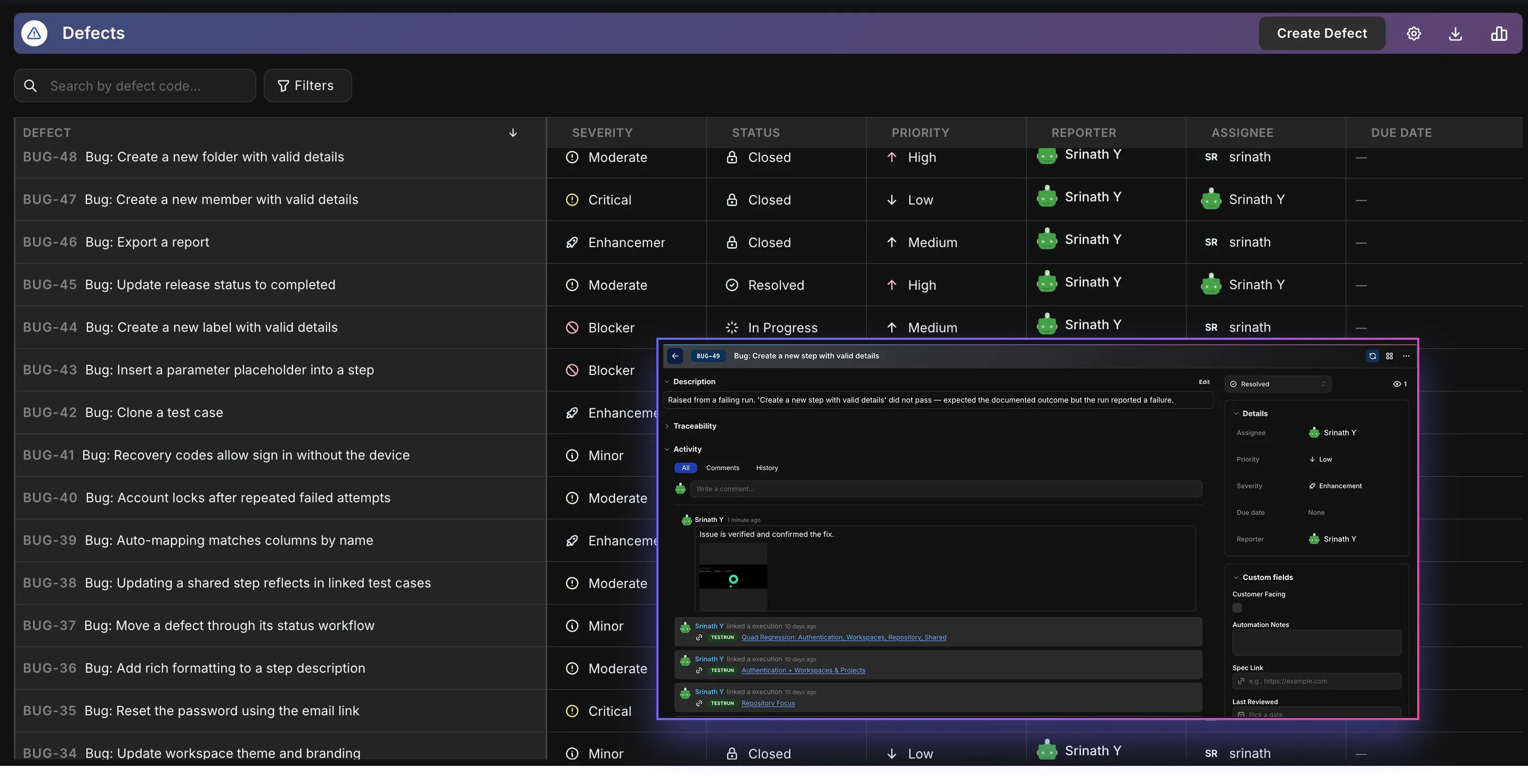
List view — The same defects as a table — sort, filter, and edit inline, with every column you care about.
The same defects as a table — sort, filter, and edit inline, with every column you care about.
Duplicate detection — Similar defects surfaced as you file, each with a match score — close as duplicate or link as related.
Similar defects surfaced as you file, each with a match score — close as duplicate or link as related.
Traceability — Each defect linked to the test cases, executions, releases, and requirements it touches.
Each defect linked to the test cases, executions, releases, and requirements it touches.
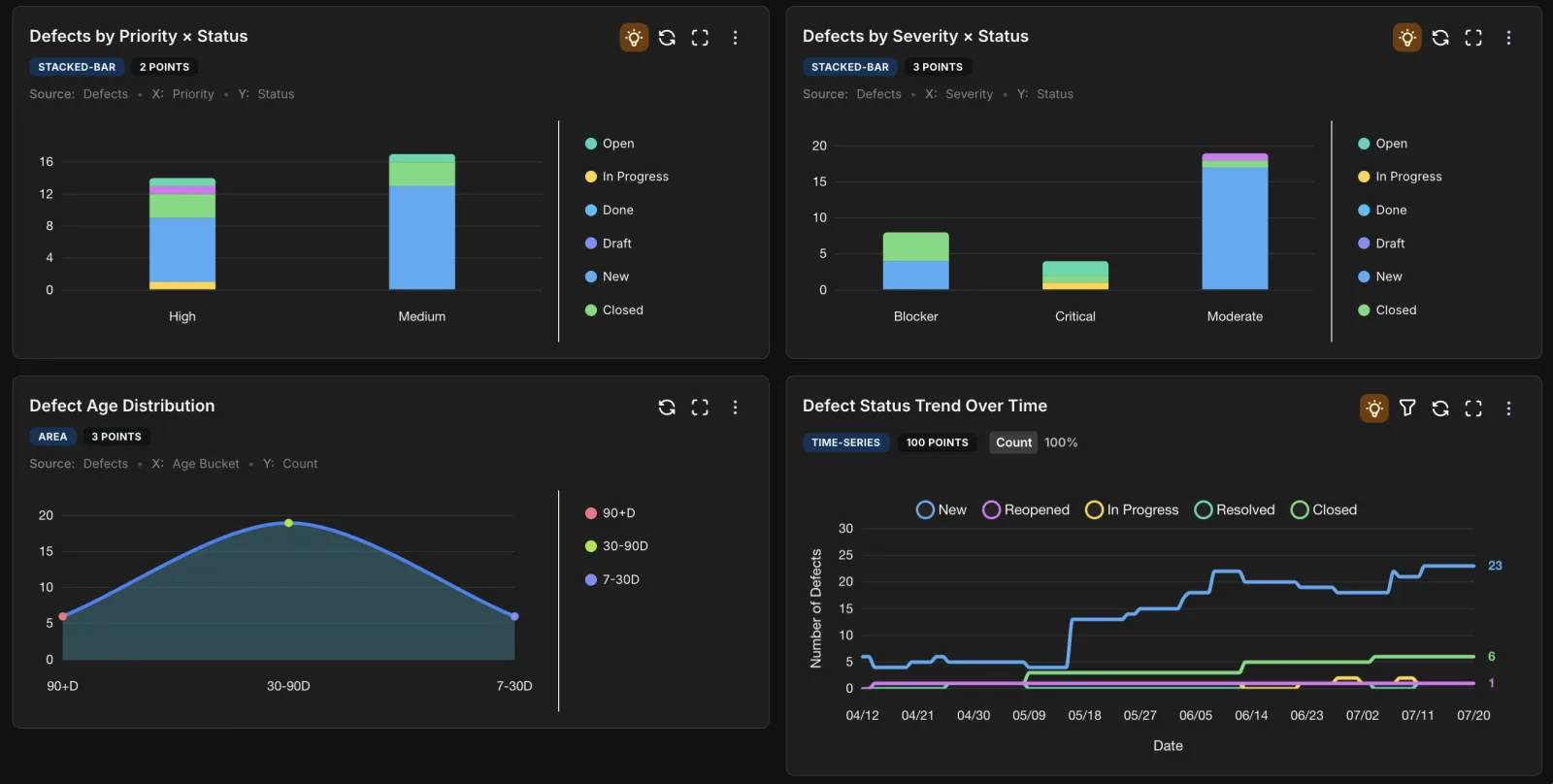
Defect insights — Defects, charted — priority and severity by status, an age distribution, and a status trend over time.
Defects, charted — priority and severity by status, an age distribution, and a status trend over time.
Where a failure goes

From a failed step to a release decision

A defect filed from a failing step keeps the context it was born with. Nobody re-types it, nobody hunts for the run it came from, and by sign-off it is already counted against the release.

  1. 01

    A step comes back failed

    Filing a defect is offered on the step itself — and only on one that failed or is blocked.

  2. 02

    The repro is already written

    The description opens prefilled from that step's own text, so the steps to reproduce are the steps you just ran.

  3. 03

    It carries the case, the run, and the step

    Not a title mentioning a test. The defect holds the test case, the execution it came from, and which step inside it.

  4. 04

    It rolls up on its own

    Onto the requirement behind the test case — and up through sub-requirements — and onto the release the work belongs to.

One open blocker holds the release at “Not ready” Defect health is a fifth of the readiness score — and an open blocker or critical overrides the rest of it
Tuesday · 4:58 PM The regression run just went red

A test fails. You start writing the bug — and before you finish the title, Hawzu shows you:

  • BUG-119 surfaced 94% match
  • Already resolved last sprint Closed · Fixed
  • Same failing test case linked

You mark it a duplicate and move on — no re-triage, no re-fix.

Defects don't work alone

Native defects are one half of Hawzu's connected quality loop — wired into the AI that catches duplicates, the reports that age and trace them, and the comparison with the tools that make you use Jira instead.

Your tests found it. Your test tool should own it.

Every feature is free while Hawzu is in early access — no credit card required.

Talk to Us

Tell us about your QA setup. We'll get back to you within 24 hours.

Book a demo

Pick a time that works — we'll confirm by email and send a calendar invite.

Select a date

Available times

Times shown in your timezone: