Run it from the test run
Press Run and Hawzu starts the build on Jenkins, GitHub Actions, or GitLab CI — with the branch and build parameters the run was configured with. No API calls of your own.
Point a test run at a Jenkins job, a GitHub Actions workflow, or a GitLab CI pipeline. Hawzu starts the build, watches it, reads the report it produced, and maps every result back to a test case — so a release decision rests on evidence, not on a green tick somebody screenshotted.
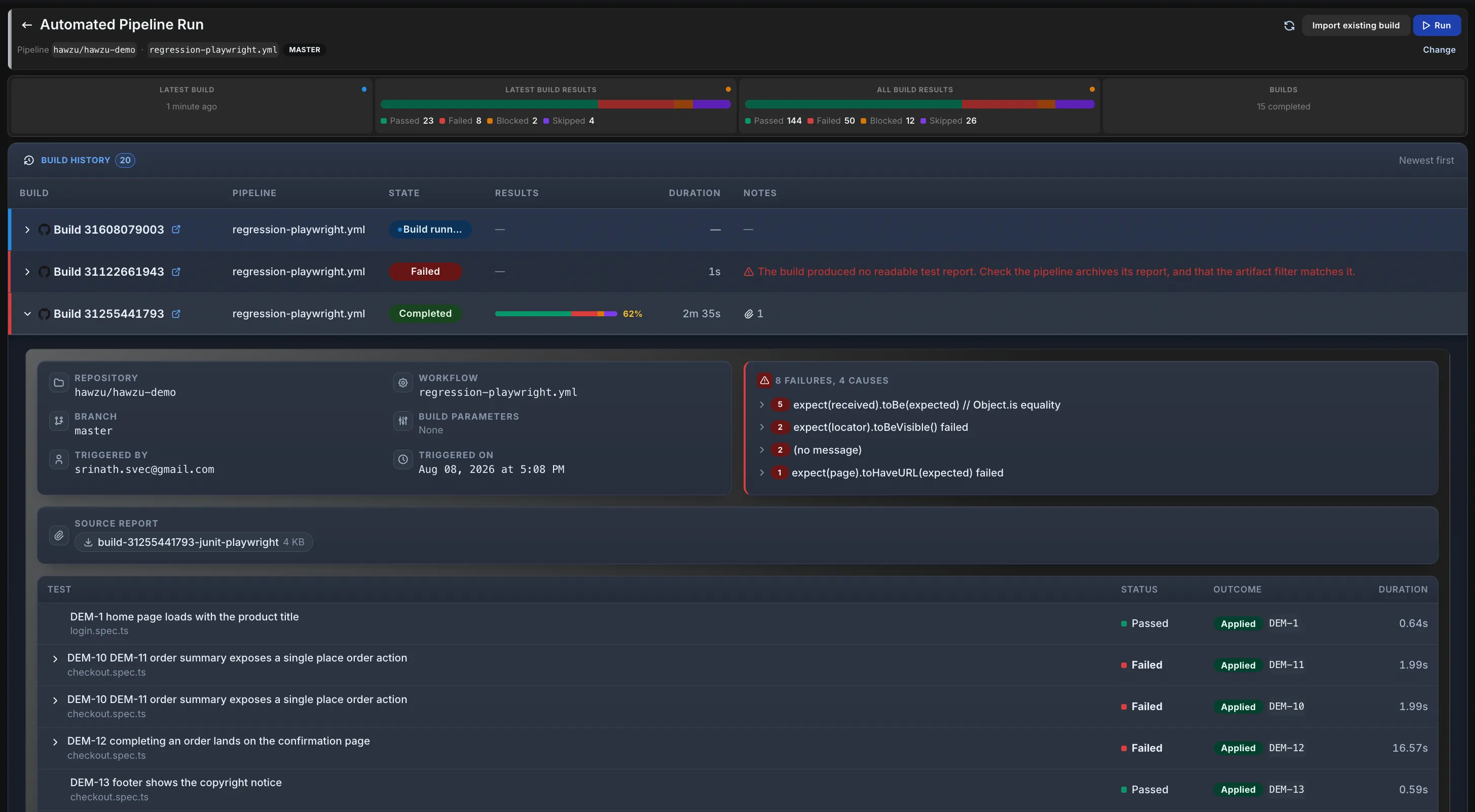
One run, one pipeline. A build still running, a completed one parsed down to every test mapped to the case it verifies, and a failed one that says why rather than going quiet.
Hawzu is not trying to be a CI platform. Your pipeline builds, deploys, and runs the tests. Hawzu treats it as an execution engine and its report as the source of truth.
Hawzu starts the build — or you point the run at a build that already ran.
Checked until it finishes, with the build's own state shown alongside Hawzu's.
Artifacts downloaded, zips unpacked, format detected, results read out.
Each result resolved to a test case by code, and recorded as a real execution result.
Plenty of tools will ingest a JUnit file. The difference is what happens to the rows that don't line up — and to the tests that never ran at all.
Press Run and Hawzu starts the build on Jenkins, GitHub Actions, or GitLab CI — with the branch and build parameters the run was configured with. No API calls of your own.
Hawzu checks on the build until it finishes and reports each stage separately — queued, running, downloading, parsing, importing. Your tests failing reads differently from the import failing.
JUnit, TRX, NUnit, Cucumber, and Allure are parsed on arrival — format auto-detected, zip artifacts unpacked. Hawzu reads reports, never your repository.
Each result resolves to a test case by its Hawzu code — stated in the report, or embedded in the test's title. Renaming a test doesn't quietly break the link.
A row that matches nothing in the run is recorded and shown, but never touches status counts, analytics, test case history, or release readiness. It cannot inflate a pass rate.
Test cases the report never mentions stay Not Executed. That gap — between what you meant to automate and what actually ran — is what a readiness dashboard needs to be honest.
Resolved to a test case and recorded as a real execution result — Passed, Failed, Skipped or Blocked.
Not in this run, or No matching test case. Kept and shown, but excluded from status counts, analytics, test case history and release readiness.
The report never mentioned them. They stay Not Executed — a case does not pass by being left out.
Every row lands somewhere, and the two that aren't results are the reason a sign-off can rest on this. Nothing is inferred, and nothing is dropped.
Matching on the test's name alone is a trap — the first rename silently breaks it. So Hawzu resolves each row in order, and never guesses at an ambiguous title.
A JUnit testcase_code property, an MSTest trait, a Cucumber @CHK-123 tag, an Allure label. Survives any rename.
No tooling at all — just put the code in the title. One test can name several cases, and each one gets the verdict.
A convenient fallback for suites that were never instrumented. Ambiguous titles are left unmatched rather than guessed.
Plenty of teams don't want a test tool starting their builds. Two ways to push instead — and both land on exactly the same import path.
Your pipeline tells Hawzu it finished; Hawzu fetches the report and imports it. HMAC-SHA256 signed, so the endpoint needs no session.
One REST call with the report as the body. Format is detected, zips are unpacked — which is how Azure DevOps, CircleCI, and Bitbucket pipelines report into Hawzu today.
curl --data-binary @results.xml \
     -H 'Authorization: Bearer <token>' \
'.../import/results?run_title=CI%20build%20123'An imported result is a real execution result — it counts towards coverage, flakiness, traceability, and release readiness exactly as a manual one does.
Every feature on every plan. Free for five people, $20 per member after — no credit card.